Currency
Toggle Nav

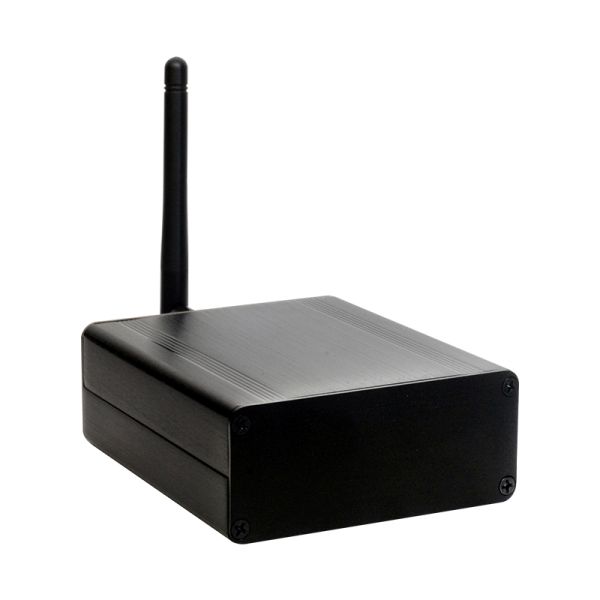


Louder Esparagus Media Center
As low as
$69.00
Availability:
In stock
Only %1 left
SKU
PIA23804
Weight
400g
Related Products:

An ESP32-based streaming media center that kicks a punch
Frequently Bought Together


What is it
Louder Esparagus is a top-of-the-range Esparagus model that uses modern, highly capable TAS5805M DAC together with ESP32 MCU and is aimed to be paired with medium-to-large speaker systems. With 25W per channel stereo output, it packs a punch and can easily enliven living quarters or dorm rooms.
It is highly efficient, but much more demanding for power when cranked; therefore, it uses either a USB-C Power Delivery to pull up to 65W from the wall power adapter or an external power source for the NOPD variant.
It can be used both with Wi-Fi and Ethernet (to make sure bad Wi-Fi would not interrupt the stream)
| USB-PD | NOPD |
|---|---|
Motivation
I did a few audio projects in the past, some using ESP32, some using larger Orange Pi and Raspberry Pi devices. Each has its pros and cons, and with each iteration, I'm trying to focus on the details that were working best for me, while actually using them.
What I like about ESP32 is how lightweight it is. It barely draws power, so you may not care to turn it off at all. It boots in seconds and is ready for use in a snap. Still, it is capable and works at par with Linux SBC solutions for audio applications, while costing a fraction of their price. Combined with a proper Hi-Fi DAC, you would not tell a difference to commercial devices standing side by side and costing much more.
Over the last few years, I have seen a few amazing software products created to deliver audio on the ESP32, like squeezelite-esp32 or euphonium. Esparagus media center devices are designed specifically to run these great pieces of software and bring a new life into aging audio equipment that most of us have at home but do not use that much these days, since it is not working with Spotify and the family.
Use cases
Louder Esparagus is a flexible, open-source audio platform designed to fit into both smart homes and custom audio projects.
- Smart Home Audio & TTS
Integrates with Home Assistant and Music Assistant for high-quality audio playback and text-to-speech announcements. Perfect for notifications, voice alerts, and whole-home audio driven by your smart home automations. - Multi-Room Audio with Snapclient
Use Louder Esparagus as a Snapclient endpoint to create perfectly synchronized multi-room audio systems. Ideal for distributed music playback without proprietary lock-in. - Standalone Player with Squeezelite-ESP32
Run Squeezelite-ESP32 for a self-contained network audio player supporting Spotify Connect, AirPlay, and Logitech Media Server (LMS) — no external computer required. - Educational Projects & Teaching Platforms
A powerful tool for schools, universities, and technical education. Louder Esparagus can be used to teach embedded systems, digital audio, networking, and open-source software — ranging from simple audio playback labs to advanced DSP, streaming, and real-time systems projects. - Research, Prototyping & Experimentation
Well-suited for rapid prototyping of audio devices, proofs-of-concept, and research projects involving DSP, low-latency streaming, wireless audio, or human-machine interaction. - A Foundation for Custom Products & DIY Builds
With all firmware and tooling fully open source, Louder Esparagus is an ideal base for custom audio devices — whether you’re building a personal DIY project, a small production run, or a community-driven product.
Features
| Louder Esparagus | Esparagus Audio Brick | |
|---|---|---|
| MCU | ESP32-WROVER-N8R8 | ESP32-WROVER-N8R8 | ESP32-S3-WROOM-N8R8 |
| DAC | Stereo I2S DAC (TAS5805M) with built-in D-Class amp | Stereo I2S DAC (TAS5825M) with built-in D-Class amp |
| Output (4Ω, 1% THD+N) | 2x 32W | 2x 45W |
| Output (8Ω, 1% THD+N) | 2x 23W | 2x 30W |
| Output (Bridge, 4Ω, 1% THD+N) | 1x 45W | 1x 53W |
| IR reader | ✅ | ❌ |
| RGB LED | ✅ | ✅ |
| I2S Microphone | ❌ | ✅ |
| OLED screen | ✅ | ✅ |
| Flash/PSRAM | 8MB/8MB | 8MB/8MB |
| Connectivity | WiFi + BT4.2 + BLE + Ethernet | WiFi + BT4.2 + BLE + Ethernet |
| Case | 88 x 38 x 100 mm Aluminum case | 110 x 100 x 50 mm DIN-rail mountable case |
| Power requirement | Generic power adapter 5..28V or USB-PD capable power adapter | Generic power adapter 5..28V |
| Software support | ||
| Squeezelite-ESP32 | ✅ | ✅ |
| Snapclient | ✅ | ✅ |
| ESPHome (HA) | ✅ | ✅ |
⚠️ Louder boards will connect to passive speakers; you can't use headphones or an external amp
💡 Need to connect an external amp? Check out HiFi Esparagus and Amped Esparagus
💡 Don't need DSP capabilities? Check out Loud Esparagus
💡 Looking for a more cost-efficient version? Check out Louder-ESP32 / Louder-ESP32-Plus
Onboard PSRAM
Audio streaming requires proper buffering to work, even with the ESP32's 500K of RAM; it is a challenging task. For that reason, all Louder-ESP32 board versions have an 8 MB PSRAM chip onboard, connected via a high-speed interface.
Which chip: ESP32 or ESP32-S3?
This board is available with either the 'classic' ESP32 or the newer ESP32-S3. They are not interchangeable for every use case, and picking the wrong one is the single most common support question — here's the short version:
- ESP32-S3 is the newer, more capable chip — more RAM headroom, a faster CPU, and native USB — but it has no Bluetooth Classic radio, so Bluetooth A2DP only works on the original ESP32.
- Squeezelite-ESP32 and standalone Snapclient: pick the classic ESP32. Neither firmware is fine-tuned for the S3 yet, and current S3 support is noticeably laggier.
- ESPHome / Home Assistant media player: pick ESP32-S3. The new Sendspin renderer runs much better on the S3's extra headroom.
- Voice assistant (wake word) in Home Assistant: ESP32-S3 is mandatory — the classic ESP32 doesn't have the RAM/CPU headroom to run it.
- AirPlay 1 & 2 (rbouteiller/airplay-esp32): both chips are fully supported; ESP32-S3 is preferred for its extra performance headroom.
| Your use case | Pick |
|---|---|
| Bluetooth A2DP from a phone/laptop | ESP32 |
| Squeezelite-ESP32 or standalone Snapclient | ESP32 |
| ESPHome media player / Sendspin | ESP32-S3 |
| Home Assistant voice assistant | ESP32-S3 |
| AirPlay 1 & 2 | Either — ESP32-S3 for more headroom |
If none of that applies to you and you just want the safe default, pick ESP32-S3 — it's the newer chip. Only choose classic ESP32 if you specifically need Bluetooth A2DP, or plan to run Squeezelite-ESP32/Snapclient today.
Board Pinout
Audio
| I2S CLK | I2S DATA | I2S WS | PSRAM CE | PSRAM CLK | DAC EN (MAX98357A) | |
|---|---|---|---|---|---|---|
| ESP32 | 26 | 22 | 25 | 16 | 17 | 13 |
Peripheral - OLED Screen and W5500 Ethernet (Louder Esparagus)
| SPI HOST | SPI CLK | SPI MOSI | SPI MISO | LAN RES | LAN CS | LAN INT | OLED DC | OLED CS | OLED RST | |
|---|---|---|---|---|---|---|---|---|---|---|
| ESP32 | 2 | 18 | 23 | 19 | 14 | 5 | 35 | 4 | 15 | 32 |
TAS5805M DAC (Louder Esparagus)
| I2C CLK | I2C DATA | PWDN | FAULT | |
|---|---|---|---|---|
| ESP32 | 27 | 21 | 33 | 34 |
Other Peripheral (Louder Esparagus)
| USB-PD EN | USB-PD POWER GOOD | IR INPUT | WS2812 RGB LED | |
|---|---|---|---|---|
| ESP32 | 13 | 36 | 39 | 12 |
Software Options
- Home Assistant smart home audio and notifications. Start from the web-installer, as soon as you configure WiFi, the boards will be discovered by the ESPHome add-in automatically. Dedicated configs can be found in the documentation for simple and stable media-player, experimental sendspin protocol, and experimental snapclient component
- Squeezelite-ESP32 Spotify Connect, AirPlay, Bluetooth or Logitech Media Server. Flash directly from your browser using the web-installer. Configure WiFi using Hotspot (default password: squeezelite). Don't forget to exit Recovery mode when done.
- Snapclient multi-room audio streaming with snapserver. Flash directly from your browser using the web-installer, as soon as you configure the WiFi board will discover the snapserver automatically
- Snapclient (edge) - developer version. Developer's version of the snapclient, less stable and more feature-rich for those who cannot wait for new features to be released. Installed via web-installer, similar to standard snapclient
- AirPlay 1 & 2 with Sendspin, Bluetooth, and full DSP control. Native, actively developed AirPlay 1 & 2 firmware (rbouteiller/airplay-esp32) with PTP multi-room sync, an experimental Sendspin renderer, Bluetooth A2DP on the ESP32 revision, and full 15-band DSP control over the TAS5805M from the board's web UI. Flash straight from your browser with the web-installer — no toolchain needed. See AirPlay 2 support below for details.
- Your own software. Use Arduino IDE or Platformio IDE and the provided software samples
AirPlay 2 support
Louder Esparagus runs rbouteiller/airplay-esp32, an open-source AirPlay 1 & 2 receiver you can flash straight from your browser via the web-installer — no PlatformIO or toolchain required. It's a separate firmware image from Squeezelite-ESP32 and Snapclient above, so flash whichever matches how you want to use the board.
- AirPlay 1 & 2 — shows up natively in Control Center and any AirPlay app, with PTP-based multi-room sync
- Sendspin (experimental) — an open multi-room protocol renderer sharing the same output path, DSP, and volume control as AirPlay
- Bluetooth A2DP on the ESP32 revision — phones and laptops can stream directly whenever AirPlay is idle (the ESP32-S3 revision has no Bluetooth Classic radio)
- On-device display — the OLED (ESP32 revision) or color TFT (ESP32-S3 revision) shows track metadata and progress for AirPlay, Bluetooth, and Sendspin alike
- USB audio (UAC) — the ESP32-S3 revision can be built as a USB sound card for a connected computer, sharing the same DAC path and DSP
- Full DSP control — the TAS5805M's on-chip EQ is fully exposed: 15 cascaded biquad sections per channel, each an arbitrary peaking filter, shelf, high/low pass, band pass, notch, phase shift, or raw coefficients, plus a crossover builder — all from the board's web UI
TAS58xx DSP: full parametric EQ and crossover control
AirPlay 2 support above isn't just playback — it exposes the TAS5805M's on-chip DSP in full from the board's web UI:
- 15 biquad (BQ) filters per channel, usable as a full 15-band parametric equalizer
- Bi-amp filter configuration for 2-way speaker systems — split the signal between tweeter and woofer with independent filter chains per amplifier
- Low-pass filtering for subwoofer tuning and bass enhancement
- Generic filters for speaker and room equalization — peaking filters, shelf filters, and EQ sections with a configurable Q-factor, applied per channel individually or to both at once
| A | B |
|---|---|
Work in progress: REW (Room EQ Wizard) integration, to drive automatic room-correction algorithms directly from a measured response.
Using with Home Assistant
Both HiFi Esparagus versions were created specifically to be used with Home Assistant via ESPHome integration. For both boards, rich configs were pre-created with hardware configuration for common use cases. These include
- media_player component for simple and robust media playback and TTS announcements (with ducking effect)
- Sendspin media player – new experimental protocol for multi-room sync with media controls and more
- An experimental snapclient component that allows near-perfect multi-room sync and seamless integration with Music Assistant
- Another snapclient fork with an implemented 15-band software equalizer and a rich set of EQ presets
- Voice assist config does not exist for Louder Esparagus yet, since it required S3 version of the ESP32. It is as work in progress.
Configurations are being actively maintained and upgraded, new experimental components added for you to test and enjoy
Hardware
| Louder Esparagus |
|---|
Please visit the hardware section for board schematics and PCB designs. Note that PCBs are shared as multi-layer PDFs as well as Gerber archives.
Boxed
| Louder Esparagus |
|---|
| Louder Esparagus NOPD |
|---|
PCB
| Louder Esparagus |
|---|
BTL and PBTL mode (TAS5805M DAC)
TAS5805M DAC allows 2 modes of operation - BTL (stereo) and PBTL (parallel, or mono). In Mono amp, we will use a completely different modulation scheme and basically will fully synchronize output drivers. Jumpers on the board allow both output drivers to connect to the same speaker. The most important step is to inform the Amp to change modulation in the first place via I2C commands. In the case of sqeezelite DAC controlsset value is the following:
dac_controlset: {"init":[{"reg":3,"val":2},{"reg":3,"val":3},{"reg":2,"val":4}],"poweron":[{"reg":3,"val":3}],"poweroff":[{"reg":3,"val":0}]}compared to default:
dac_controlset: {"init":[{"reg":3,"val":2},{"reg":3,"val":3}],"poweron":[{"reg":3,"val":3}],"poweroff":[{"reg":3,"val":0}]}One can test audio with a single speaker connected between L and R terminals (plus on one side and minus on the other). Optionally, jumpers on the board will effectively connect the second driver in parallel, doubling the current capability.
An important point: this will send only one channel to the output; that’s just how the DAC works. True mono as (L+R)/2 is possible via a more in-depth configuration (very poorly documented), but I haven’t managed to configure that on the stand. I’m still working on that. (Along with a few more really cool DSP features that this DAC has, like EQ, subwoofer mode, and tone compensation settings)
| BTL | PBTL | |
|---|---|---|
| Descriotion | Bridge Tied Load, Stereo | Parallel Bridge Tied Load, Mono |
| Rated Power | 2×23W (8-Ω, 21 V, THD+N=1%) | 45W (4-Ω, 21 V, THD+N=1%) |
| Schematics | ||
| Speaker Connection |
Starting from Rev E, an additional header is exposed to allow datasheet-specced connectivity
| Image | Legend |
|---|---|
| Stereo Mode - leave open | |
| Mono (PBTL) Mode, close horisontally |
TAS5805M DSP capabilities
The TAS5805M DAC has a very powerful DSP that allows doing lots of data processing on the silicon that otherwise would take a considerable part of your CPU time. As of the moment of writing, it is mostly an undiscovered part of the DAC since, unfortunately, TI is not making it very easy for developers. (A minute of complaint) To be more specific, you need to be (A) a proven hardware manufacturer to get access to the configuration software, namely PurePath. (B) you need to apply for a personal license and go through an approval process, and after a few weeks of waiting, you get access to one DAC configuration you asked for. (C) You find out that it will work with TI's own evaluation board that will set you back $250 if you'd be able to find one. Otherwise, all you have is a list of I2C commands that you need to transfer to the device on your own cost. No wonder no one knows how to use it.
But moanings aside, what do you get after:
- Flexible input mixer with gain corrections
- 15 EQ with numerous filter configurations
- 3-band Dynamic Range Compression with flexible curve configuration
- Automatic Gain Limiter with flexible configuration
- Soft clipper
- and a few other things
At this moment, it is very experimental. In a perfect world, you should be able to adjust all of those settings to make your speaker-enclosure setup work the best it can and even apply your room factors into the equation. But with athe bove disclaimer I can only deliver a limited set of configurations corresponding to the most common use cases:
- Stereo mode with enabled DRC (Loudness) and AGL settings
- Full-range Mono mode with DRC (Loudness) and AGL settings
- Subwoofer Mono mode with few filter frequency options
- Bi-amp configuration with few crossover frequency options
All of the above are available right now for experimentation. I'm keen to hear your feedback while I move forward with porting this to other software options
- [X] - Bare I2S TAS5805M library
- [X] - espragus-snapclient software (You may use Louder-ESP32 firmware for the Louder-Esparagus)
- [ ] - squeezelite-esp32 <- to do
- [ ] - flexible configurations with on-the-fly configuration changes
Louder Esparagus power considerations
The Louder Espragus can be quite a power-hungry device; simply using 5V over the USB-C is clearly not an option. The intention for using a PD-enabled power adapter to run the board is simplicity and ease of use for customers. Ideally, you should supply a 20V 3.25-Amp capable power source, which is common for modern laptops (Dell, HP, and Lenovo have all tested and work perfectly). However, pretty much any 9V/12V/20V PD-enabled power adapter will work, most typically phone chargers with a quick charge option. The smallest of the family is a 25W model, which is plenty enough for a living space.
The interesting part was that all the phone and laptop chargers I used for the test (around five different makes of each) sounded great, with no hissing and no popping. (Apart from the Apple ones, they didn’t work. Likely they have Apple-specific PD protocol). This is probably because modern devices have become so noise-sensitive that manufacturers have been forced to do good work on noise levels.
Tested and perfectly working models are (others may be available)
| Model | Image |
|---|---|
| 65W USB-C Lenovo ThinkPad Laptop Charger Replacement Power Adapter | |
| 65W 45W 20V 3.25A Type-C PD Laptop Charger | |
| 120W Gan Type-C PD Charger | |
| 45W Type-C PD Mobile Phone Wall Adapter |
Because USB-PD is a bit of a Wild West in terms of standards, sometimes, not everything goes as designed. Some people have run into this with power adapters that aren’t fully PD-standard compliant. In most cases, the worst that happens is the PD chip doesn’t trigger the 20V mode, so the Esparagus runs at around 5W per channel (which you might not even notice). One person reported that an older adapter somehow triggered just 1V on the USB-C power line, shutting down the Esparagus shortly after plugging in. Thankfully, we’ve confirmed that it works correctly with newer laptop adapters.
Louder Esparagus NOPD
The “hammer-style” solution I came up with is a new NOPD version of the Louder Esparagus that lets you use a barrel power jack to supply raw voltage directly. The catch? Standard 2mm pins can’t handle high currents, so I’ve gone with a 2.5mm pin instead — it’s a bit unusual, but still common enough in the laptop world.
With this setup, you can supply more than the 20V limit of PD, giving you a bit more power for the speakers. You probably won’t hear much difference (thanks to the way human hearing works), but it could help larger speakers that need a bit more to really “open up." Other than that, the NOPD version works just like the PD version — no software changes are needed.
External voltage selection
The power adapter specs depend on the speaker you're planning to use. DAC efficiency is close to 100%, so just take the power rating of your speaker (say 2x10w), and impedance (say 8 ohms) and you'd need at least 9 volts rated at 1.2 amps per channel, round up to 3 total amps.
It is not recommended to go beyond the voltage your speakers can take, otherwise, the amp will blow your speakers in no time.
The absolute maximum voltage for the TAS5805M DAC is 30V, but it is not guaranteed to be thermally stable in this condition.
Sponsorship & Community Support
If you’re working on an open-source project, an educational initiative, or any pro-bono/volunteer effort, feel free to reach out for sponsorship details. I’ll do my best to provide discounts or even free boards.
Custom Design & Consultation
If you’re interested in a custom design based on or inspired by my boards, I also offer contract design work and consultation when needed.
Write Your Own Review
Bestselling Products You May Like


New Products You May Want

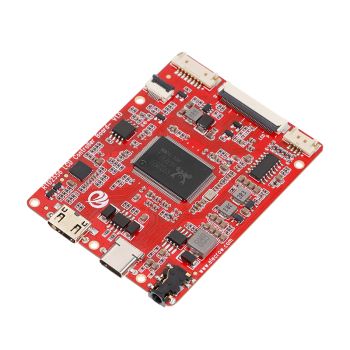
RTD2556 Driver Board/Controller Board for HD Monitor With EDP 30Pin 1920x1080p Touch Function
was
$20.90
Special Price
$14.63

Warranty
Service

VIP Distributor
Discount

Professional
Tech Support

Fast
Delivery
×
 Add to cart successfully!


Add to cart successfully!
Customers Who View This Item Also Bought