Currency
Toggle Nav

Tech blogs
-
February 12, 2020
More and more people recognize the word steam. Because it’s a comparatively new educational concept, how much do you know about it? This blog will break it down for you and let you get to know it better.
What is STEAM Education?
STEAM Education which mainly focused on S-(science), T-(technology), E-(engineering), A-(art) and M-(math). STEAM education is a comprehensive education integrating science, technology, engineering, art, and mathematics.
-
January 03, 2020
Due to the increasing use of extension screens for work and study, a good screen is favored. It's hard to choose a screen that suits you because of the size, use, and variety of functions. There are different types of monitors depends on how you plan on using it, and there is no catch-all monitor that is perfect for everyone, but some monitors are more versatile than others.
We have selected several popular screens of Elecrow in 2019 for your reference. You can choose the most suitable one according to your own needs.
1.Two of the most popular screens that can be used with consoles like raspberry PI
-
August 30, 2019
Raspberry Pi 4 has been launched for months, maybe you have had one, otherwise please check the latest Elecrow Raspberry Pi 4 Kit (P4 (4GB) included).
Since the Pi 4 has upgraded significantly in its speed, memory and data connection, now you can make more projects than before, with better performance. Elecrow selects a total projects out of the internet for you.
PS: We will keep updating this post for months, please bookmark it.
-
August 22, 2019
1. What is AXI?
AXI is short for automated X-ray inspection, it's one of the most commonly used approaches for defect inspection in PCB Assembly. Not only does AXI check the solder joints under components, but it also reveals many defects in solder joints that may not be visible by the ordinary optical inspection equipment.
-
April 24, 2019

I work as the sales&Marketing manager in Elecrow company. One of its business is to develop STEAM education products. So I learned lots of new knowledge in this area both from my working career and the after-work activities. In this article, I will talk about the topic of why teach kids to code according to my personal experience and independent thinking.

I was born in 1991, a poor village inside a rural mountain area in China. When I was a child, my parents
-
March 29, 2019
The last time we did the first version of Sundancer and received many good feedback, so this time we will make a new ones which is more elegant and cool Sundancer.
This time we will use acrylic materials to build this project. Below is a butterfly-shaped box that can be used to hide the main control board and other things to make it look simpler and more beautiful. Of course, if you have a small charger, you can put it inside, so that the Sundancer is dancinf like a magic!
-
February 18, 2019More and more devices have USB-C ports as the main interface. Compared to the USB Type-A port, the USB-c port provides a range of powerful features that enable a variety of roles. Smartphones have switched to new USB-C ports due to their faster charging and data transfer capabilities, and many modern laptops have USB-C ports. As mentioned earlier, Apple's MacBook Pro fully embraces this powerful new technology and only supports the USB-C port. According to the site, Apple will likely have its 2019 series of iPhones come with USB Type-C support.
-
January 28, 2019Not all of us we’re able to buy or get CrowPi for our own, In Elecrow, we care about all our customers so we crafted a special tutorial on how to use Minecraft magic blocks with NFC chips without CrowPi!
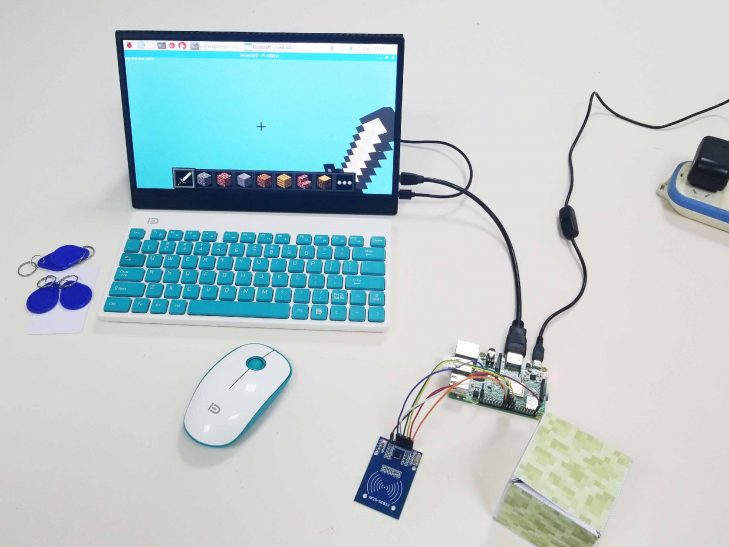 Follow this instructions step by step on your fresh new raspberry pi image in order to get the RFID working on your raspberry pi with RC-522 module and be able to play using RFID Module and the NFC chips!
https://github.com/Elecrow-keen/CrowPi.git clone and install the RC-522 driver from the Drivers/RFID/ directory using the command "python setup.py install"
Follow this instructions step by step on your fresh new raspberry pi image in order to get the RFID working on your raspberry pi with RC-522 module and be able to play using RFID Module and the NFC chips!
https://github.com/Elecrow-keen/CrowPi.git clone and install the RC-522 driver from the Drivers/RFID/ directory using the command "python setup.py install"
-
December 13, 2018We have been doing with the CrowPi Python Lessons to encourage people to learn electronics, computer science and programming these days.And now they are done so you can do something by yourself with your CrowPi. As we all know, python is an interpreted, high-level, general-purpose programming language, and now is commonly used in artificial intelligence projects and extensively used in the information security industry, including in exploit development.That’s the reason why we worked out this series of videos to teach you how to programming in python with CrowPi . In addition, you can master the basic common knowledge
-
November 30, 2018My neighbor has a little girl with bad arithmetic. This is a headache when her parents direct her arithmetic, so I want to use Crowpi to program a simple calculator to help people who are not good at computing. My idea is to use the 4 independent buttons on Crowpi as +, - , *, /, and then use the 10 buttons on the matrix button to do 0-9 respectively.When I press these buttons, Crowpi Lcd can display the contents of the button I pressed. When I want to get the result, just touch the touch sensor and it will automatically display the result on the LCD. With the basic ideas, let's get started. Of course, the first thing to do is always to import the modules we want to use. import math import time