Currency
Toggle Nav

Difference Between Elecrow CrowView Note 14" and 15.6" – Which One is Better for You?
February 12, 2026

Difference Between Elecrow CrowView Note 14" and 15.6" – Which One is Better for You?
If you’ve ever looked at your Raspberry Pi or high-end smartphone and thought, "I wish this had a screen and a keyboard," then you’ve probably heard of the CrowView Note.
After the massive success of the original 14-inch CrowView Note (It garnered support from over 1,500 backers on Kickstarter and was fully funded in just 28 minutes, raising over $270,000 in total). Recently, Elecrow launched a 15.6-inch model of the CrowView Note.
In this guide, we’re breaking down the differences and seeing if the bigger sibling is the upgrade you’ve been waiting for.
❤ What is the CrowView Note?
The CrowView Note is an all-in-one portable monitor compatible with smartphones, single-board computers (such as the Raspberry Pi 5 and Jetson Nano), mini PCs, and game consoles.
Its appearance and feel are similar to those of a laptop. However, it doesn’t have its own CPU or RAM. Instead, it provides a 1080p screen, a full keyboard, a trackpad, speakers, and a large internal battery. By connecting a "brain" via USB-C or HDMI, you transform your mobile devices into a fully functional workstation. It provides a clean, organized workspace, enhancing your productivity anywhere.
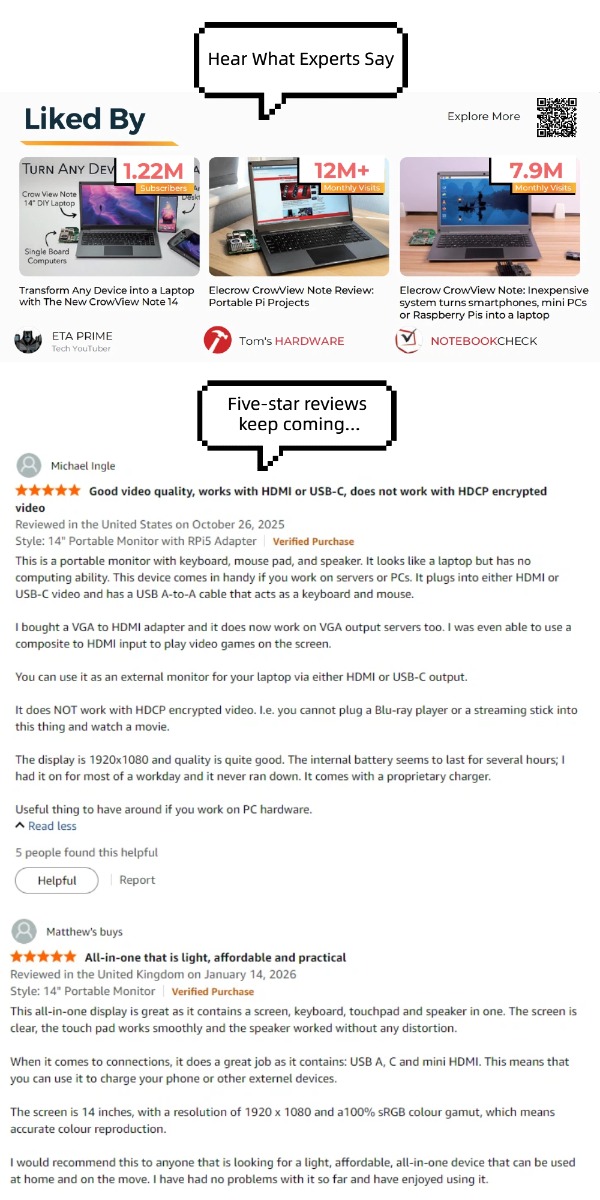
Hear What Experts Say ↓↓↓
❤ Who is the CrowView Note For?
The CrowView Note isn't just a gadget; it’s a productivity multiplier for three specific groups:
● Raspberry Pi & SBC Enthusiasts: With custom "bridge boards," you can snap a Raspberry Pi 5 or Jetson Nano directly onto the side, turning it into a neat, cable-free Linux laptop.
● Handheld Gamers: Owners of the Steam Deck, ROG Ally, or Nintendo Switch can plug in via USB-C to enjoy their games on a larger screen with a dedicated keyboard for chat or desktop-mode productivity.
● Smartphone Power Users: Users of Samsung DeX or Motorola Ready For can turn their phones into a mobile office in seconds.
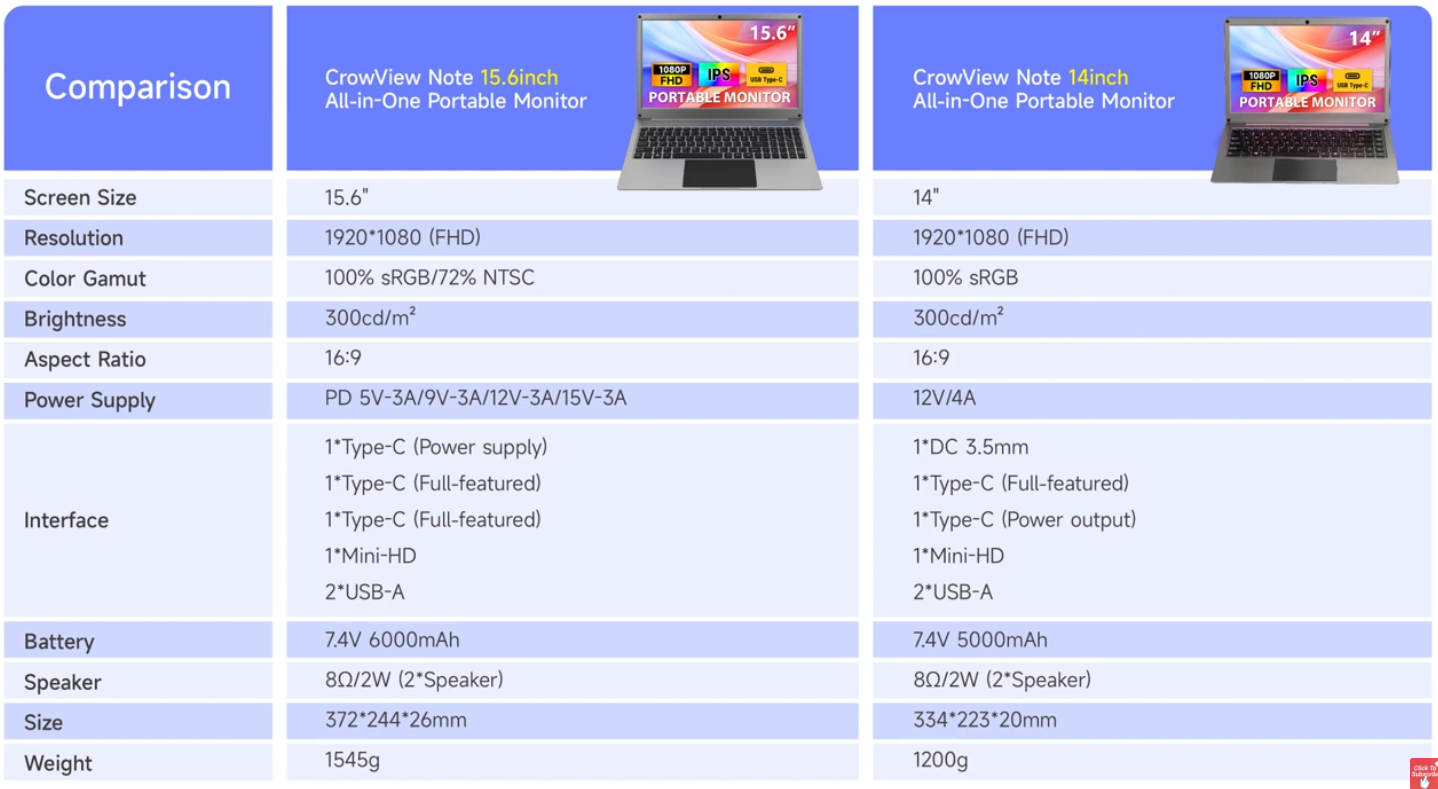
❤ Comparison: CrowView Note 15.6" vs. 14"
❤ Key Upgrades in the CrowView Note 15.6" Model
While the larger screen is the most obvious change, the 15.6-inch model isn't just a "stretched" 14-inch model; it addresses the most common feedback from the original community.
1. TypeC PD 65W Power Adapter
The original 14" model used a proprietary DC barrel jack, meaning you had to carry a specific power brick. The 15.6" model upgrades with a Type-C PD 65W power adapter. This means you can use the same charger for your laptop, phone, and CrowView Note, drastically simplifying your cable management.
2. Larger 6000mAh Battery & Reverse Charging
The battery has been bumped up to 6000mAh, providing more "juice" to power not just the monitor, but also the connected device. It supports reverse charging, so it can act as a massive power bank for your smartphone while you work.
3. Wider SBC Compatibility
In addition to the existing Raspberry Pi, Jetson, Orange Pi, and LattePanda, the 15.6-inch model also officially supports a new development board — Arduino UNO Q.
❤ Which One Should You Choose?
Choose the CrowView Note 14" if...
● Portability is of Utmost Importance: You want the lightest possible setup for your backpack.
● Classic SBC Projects: You primarily use a Raspberry Pi 4/5 and want the most compact "laptop" housing for it.
● Budget-Conscious: You want the core lapdock experience at the lowest entry price.
Choose the CrowView Note 15.6" if...
● Modern Charging Experience: Not needing a DC barrel jack is worth the upgrade alone for travelers.
● Larger screen experience: If you need to type, program, or enter data for work, a larger screen is crucial and will give you an unparalleled, superior experience.
● Gaming & Media: The extra screen real estate makes a noticeable difference when playing Steam Deck games or watching movies.
❤ FAQ
Q: Does the CrowView Note have its own operating system?
A: No. It is a monitor and input device. It only works when connected to a "brain" like a phone, laptop, or Raspberry Pi.
Q: Can I connect two devices at once?
A: Yes! You can connect one device via Mini HDMI and another via USB-C, then use the F1 function key to toggle between them instantly (built-in KVM functionality).
Q: Does it work with the Raspberry Pi 5?
A: Absolutely. Both models include the necessary ports to connect a Pi 5 via HDMI and USB, making it the most popular "Pi-top" solution on the market.
Q: Can it charge my phone while connected?
A: Yes! Through the full-featured Type-C port, the CrowView Note provides reverse charging to your smartphone while you use it in desktop mode.
Q: Does it support the iPhone?
A: Yes, it supports iPhone 15 and 16 series (via USB-C). Older iPhones require a Lightning-to-HDMI adapter.
Q: Does it support touch screen?
A: No, the current CrowView Note models focus on a high-quality IPS display with a trackpad for navigation rather than a touch-sensitive panel.
Q: Do I need to install any drivers?
A: No. It is a "Plug and Play" device. As long as your source device supports video output via USB-C (DisplayPort Alt Mode) or HDMI, it will work instantly.
Q: Does the CrowView Note have a built-in battery?
A: No. Both models are designed to be lightweight and slim, so they require an external power source (like a power bank or a wall adapter) to function.
Q: Can I connect my Nintendo Switch?
A: Yes! Using the full-featured Type-C port, you can plug your Switch directly into the CrowView Note for big-screen gaming anywhere.
❤ Conclusion
Ready to Revolutionize Your Mobile Setup?
Whether you are a developer looking to build the ultimate Raspberry Pi workstation, a gamer wanting a more immersive handheld experience, or a professional turning your smartphone into a mobile office, the CrowView Note is the missing piece of your tech puzzle.
Don't settle for a tiny screen and a cramped virtual keyboard. Experience the freedom of a full laptop setup that fits in your backpack and connects to almost anything.
Join the thousands of enthusiasts who have already made the switch. Your Unique journey deserves a better view! :)
Check out the CrowView Note 14"
Check out the CrowView Note 15.6"