Currency
Toggle Nav

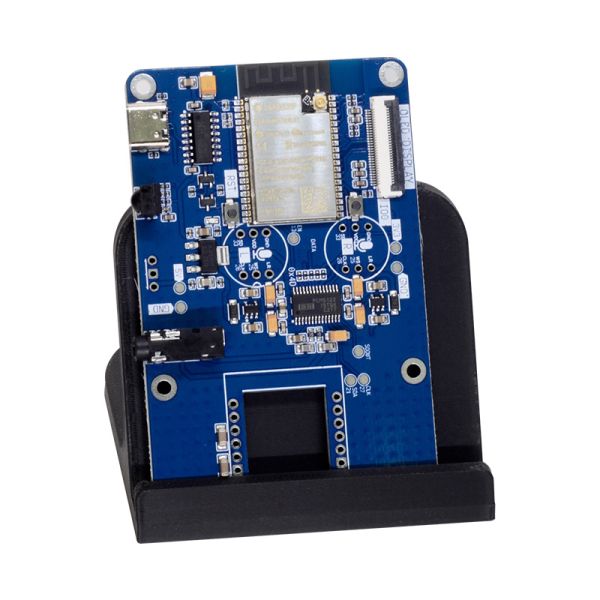


HiFi ESP32 Plus
As low as
$24.00
Availability:
In stock
Only %1 left
SKU
PIA23809
Weight
100g
Related Products:


ESP32 audio development board with PCM5122 I2S DAC, delivering 2.1V RMS audio with -112dB noise level
Frequently Bought Together


What is it
The HiFi-ESP32 Plus represents the next evolution of HiFi-ESP32 boards, featuring the advanced PCM5122 DAC with built-in DSP capabilities. This board maintains the same audio quality as the original HiFi-ESP32 while adding powerful digital signal processing features, including parametric EQ (6 BQs), and DRC. The PCM5122's flexible DSP engine can be configured for various audio enhancement scenarios, making it ideal for projects requiring sound tuning
Key Features:
- PCM5122 DAC with integrated DSP
- Parametric EQ and DRC
- Digital volume control (avoids loss of resolution compared to software volume)
- Advanced audio processing features (DRC)
- Same form factor and connectivity as HiFi-ESP32
Use cases
HiFi-ESP32 Plus is a flexible, open-source audio platform designed to fit into both smart homes and custom audio projects.
- Smart Home Audio & TTS
Integrates with Home Assistant and Music Assistant for high-quality audio playback and text-to-speech announcements. Perfect for notifications, voice alerts, and whole-home audio driven by your smart home automations. - Multi-Room Audio with Snapclient
Use HiFi-ESP32 Plus as a Snapclient endpoint to create perfectly synchronized multi-room audio systems. Ideal for distributed music playback without proprietary lock-in. - Standalone Player with Squeezelite-ESP32
Run Squeezelite-ESP32 for a self-contained network audio player supporting Spotify Connect, AirPlay, and Logitech Media Server (LMS) — no external computer required. - Educational Projects & Teaching Platforms
A powerful tool for schools, universities, and technical education. HiFi-ESP32 Plus can be used to teach embedded systems, digital audio, networking, and open-source software — ranging from simple audio playback labs to advanced DSP, streaming, and real-time systems projects. - Research, Prototyping & Experimentation
Well-suited for rapid prototyping of audio devices, proofs-of-concept, and research projects involving DSP, low-latency streaming, wireless audio, or human-machine interaction. - A Foundation for Custom Products & DIY Builds
With all firmware and tooling fully open source, HiFi-ESP32 Plus is an ideal base for custom audio devices — whether you’re building a personal DIY project, a small production run, or a community-driven product.
Features
| HiFi-ESP32 | HiFi-ESP32-Plus | |
|---|---|---|
| MCU | ESP32-WROVER-N8R8 or ESP32-S3-WROOM-N8R8 | ESP32-WROVER-N8R8 or ESP32-S3-WROOM-N8R8 |
| DAC | PCM5100A 32bit Stereo DAC (-100 dB typical noise level) | PCM5122 32bit Stereo DAC with integrated DSP (-112 dB typical noise level) |
| Output | Non-amplified stereo output, 2.1V RMS | Non-amplified stereo output, 2.1V RMS |
| Flash/PSRAM | 8MB/8MB | 8MB/8MB |
| Power | 5V over USB-C, 2x LP5907 3.3 V Ultra-Low-Noise LDO for analog section | 5V over USB-C, 2x LP5907 3.3 V Ultra-Low-Noise LDO for analog section |
| Connectivity | WiFi + BT4.2 (except S3) + BLE Ethernet (optional module) | WiFi + BT4.2 (except S3) + BLE Ethernet (optional module) |
| DSP Features | ❌ | Parametric EQ (6xBQ), DRC ** |
| Software support | ||
| Squeezelite-ESP32 | ✅ | ✅ |
| Snapclient | ✅ | ✅ |
| ESPHome (HA) | ✅ | ✅ |
⚠️ HiFi boards require an external amplifier or active speakers; you can't connect passive speakers to it.
💡 Need to connect speakers as well? Check out Amped-ESP32 / Amped-ESP32-Plus
💡 Need only speakers output? Check out Loud-ESP32 / Loud-ESP32-Plus
💡 Need more powerful DSP? Check out Louder-ESP32 / Louder-ESP32-Plus
** Enabling EQ controls in software is a work in progress
💡 Looking for a more feature-packed version? Check out HiFi Esparagus
Onboard PSRAM
Audio streaming requires proper buffering to work, even with the ESP32's 500K of RAM; it is a challenging task. For that reason, all Louder-ESP32 board versions have an 8 MB PSRAM chip onboard, connected via a high-speed interface.
Which chip: ESP32 or ESP32-S3?
This board is available with either the 'classic' ESP32 or the newer ESP32-S3. They are not interchangeable for every use case, and picking the wrong one is the single most common support question — here's the short version:
- ESP32-S3 is the newer, more capable chip — more RAM headroom, a faster CPU, and native USB — but it has no Bluetooth Classic radio, so Bluetooth A2DP only works on the original ESP32.
- Squeezelite-ESP32 and standalone Snapclient: pick the classic ESP32. Neither firmware is fine-tuned for the S3 yet, and current S3 support is noticeably laggier.
- ESPHome / Home Assistant media player: pick ESP32-S3. The new Sendspin renderer runs much better on the S3's extra headroom.
- Voice assistant (wake word) in Home Assistant: ESP32-S3 is mandatory — the classic ESP32 doesn't have the RAM/CPU headroom to run it.
- AirPlay 1 & 2 (rbouteiller/airplay-esp32): support for this board's DAC is planned on both chips; ESP32-S3 will be preferred for its extra performance headroom.
| Your use case | Pick |
|---|---|
| Bluetooth A2DP from a phone/laptop | ESP32 |
| Squeezelite-ESP32 or standalone Snapclient | ESP32 |
| ESPHome media player / Sendspin | ESP32-S3 |
| Home Assistant voice assistant | ESP32-S3 |
| AirPlay 1 & 2 (coming soon) | Either — ESP32-S3 for more headroom |
If none of that applies to you and you just want the safe default, pick ESP32-S3 — it's the newer chip. Only choose classic ESP32 if you specifically need Bluetooth A2DP, or plan to run Squeezelite-ESP32/Snapclient today.
Board Pinout
HiFi-ESP32 Plus
| I2S CLK | I2S DATA | I2S WS | I2S MCLK (optional) | PSRAM RESERVED | DAC/AMP EN | I2C SDA | I2C CLK. | |
|---|---|---|---|---|---|---|---|---|
| ESP32 (J) | 26 | 22 | 25 | 0 | 16, 17 | 13 | 27 | 21 |
| ESP32-S3 (H) | 14 | 16 | 15 | 0 | 35, 36, 37 | 4 | 41 | 42 |
| ESP32 (J1+) | 26 | 22 | 25 | 0 | 16, 17 | 13 | 21 | 27 |
| ESP32-S3 (H1+) | 14 | 16 | 15 | 0 | 35, 36, 37 | 4 | 42 | 41 |
Ethernet
| SPI CLK | SPI MOSI | SPI MISO | SPI CS | SPI HOST/SPEED | ETH INT | ETH RST | |
|---|---|---|---|---|---|---|---|
| ESP32 | 18 | 23 | 19 | 05 | 2/20MHz | 35 | 14 |
| ESP32-S3 | 12 | 11 | 13 | 10 | SPI2/20MHz | 6 | 5 |
Optional peripheral
| IR IN | RGB OUT | OLED SPI HOST/SPEED | OLED SPI CLK | OLED SPI MOSI | OLED SPI MISO | OLED SPI CS | OLED SPI DC | OLED RST | |
|---|---|---|---|---|---|---|---|---|---|
| ESP32 | 39 | 12 | 2/20MHz | 18 | 23 | 19 | 15 | 4 | 32 |
| ESP32-S3 | 7 | 9 | SPI2/20MHz | 12 | 11 | 13 | 39 | (37) | 38 |
Software Options
- Home Assistant smart home audio and notifications. Start from the web-installer, as soon as you configure WiFi, the boards will be discovered by the ESPHome add-in automatically. Dedicated configs can be found in the documentation for simple and stable media-player, experimental sendspin protocol, and experimental snapclient component
- Squeezelite-ESP32 Spotify Connect, AirPlay, Bluetooth or Logitech Media Server. Flash directly from your browser using the web-installer. Configure WiFi using Hotspot (default password: squeezelite). Don't forget to exit Recovery mode when done.
- Snapclient multi-room audio streaming with snapserver. Flash directly from your browser using the web-installer, as soon as you configure the WiFi board will discover the snapserver automatically
- Snapclient (edge) - developer version. Developer's version of the snapclient, less stable and more feature-rich for those who cannot wait for new features to be released. Installed via web-installer, similar to standard snapclient
- AirPlay 1 & 2 (coming soon). rbouteiller/airplay-esp32 — an actively developed, open-source AirPlay 1 & 2 firmware, installable from your browser via the web-installer — already supports the HiFi-ESP32's plain PCM5100A over I2S. Support for this board's PCM5122 DAC is planned, driving it the same way (basic playback and multi-room, without exposing the PCM5122's own on-chip EQ/DRC).
- Your own software. Use Arduino IDE or Platformio IDE and the provided software samples
Using with Home Assistant
Both HiFi-ESP32 Plus versions were created specifically to be used with Home Assistant via ESPHome integration. For both boards, rich configs were pre-created with hardware configuration for common use cases. These include
- media_player component for simple and robust media playback and TTS announcements (with ducking effect)
- Sendspin media player – new experimental protocol for multi-room sync with media controls and more
- An experimental snapclient component that allows near-perfect multi-room sync and seamless integration with Music Assistant
- Another snapclient fork with an implemented 15-band software equalizer and a rich set of EQ presets
- Voice assist config for S3-based boards, allowing local voice-controlled assist and automation
Configurations are being actively maintained and upgraded, new experimental components added for you to test and enjoy
Flashing ESP32-S3
ESP32-S3 boards have two ways of firmware update: (1) similarly to classic ESP32, they can be flashed over built-in UART, or (2) uniquely for S3, over built-in USB host controller. Since it is firmware-controlled, it may be disabled if not used (or, more commonly, not available with factory default empty firmware). When come unflashed ESP32-S3 device comes into a boot loop, with a USB-CDC device appearing and disappearing every second, and requires a special flashing initialisation sequence to get flashed:
-
- Press the IO0 (FLASH) button and keep it pressed
- Press and release the RESET button. Release the FLASH button.
- ESP32-S3 will enter download mode, and the USB-CDC device will appear and stay available
- Run flashing routine as usual, either through web-serial or
esp_tool - This time, it is not possible to reboot the device over USB, so press RESET once more
- Device will boot normally into firmware, and if USB-CDC is enabled in the firmware, you will be able to flash it normally, download mode and reset sequence will work over USB.
- If you manage to flash firmware without USB-CDC support, you need to go through the above sequence once more
Hardware
Please visit the hardware section for board schematics and PCB designs. Note that PCBs are shared as multi-layer PDFs.
Optional SPI Ethernet module
Every board has a header that allows soldering in the W5500 SPI Ethernet module, which is very easy to find. The only downside is that with the module installed board will not fit the case unless it is cut to accommodate extra height.
Case
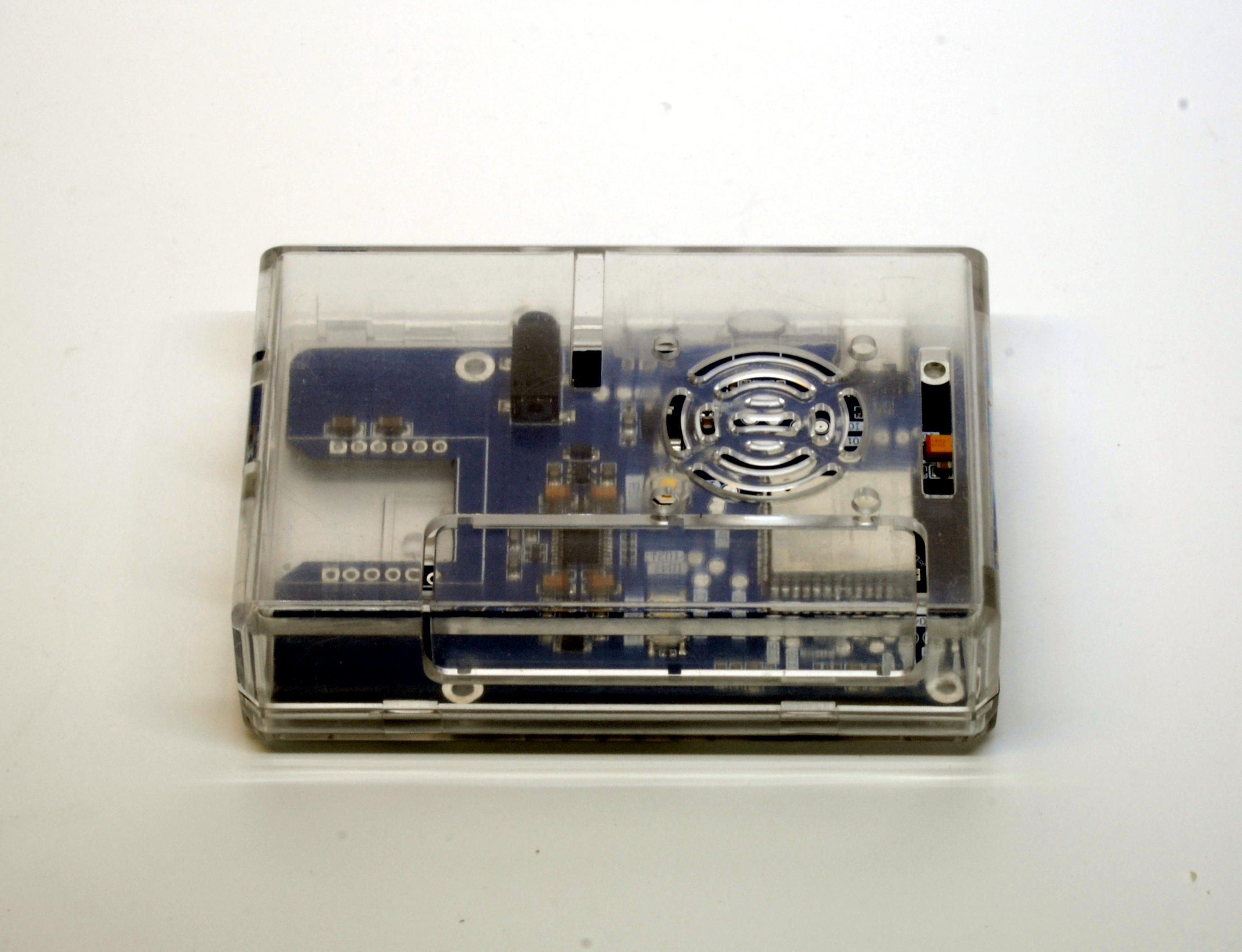
HiFi-ESP32(S3)-Plus is mechanically compatible with Raspberry Pi 4 cases, tested with transparent ones
Sponsorship & Community Support
If you’re working on an open-source project, an educational initiative, or any pro-bono/volunteer effort, feel free to reach out for sponsorship details. I’ll do my best to provide discounts or even free boards.
Custom Design & Consultation
If you’re interested in a custom design based on or inspired by my boards, I also offer contract design work and consultation when needed.
Write Your Own Review
Bestselling Products You May Like


New Products You May Want



Warranty
Service

VIP Distributor
Discount

Professional
Tech Support

Fast
Delivery
×
 Add to cart successfully!


Add to cart successfully!
Customers Who View This Item Also Bought