Story

When driving a TFT display with an STM32, there are two main ways to move pixel data: Non-DMA (Polling) and DMA (Direct Memory Access).
Imagine your STM32 is a busy chef (the CPU) and the display is a customer waiting for a meal.
- How it works: The Chef manually carries every single pea and carrot to the table one by one.
- The Problem: While carrying food, the Chef cannot cook anything else. The stove stays idle.
- The Result: The screen updates slowly, and the system might feel "laggy" because the CPU is too busy moving pixels to check for button presses or sensor data.
Now, imagine the Chef installs a conveyor belt (the DMA controller) between the kitchen and the table.
- How it works: The Chef puts a pile of food on the belt and flips a switch. He then immediately goes back to cooking the next meal.
- The Magic: The belt moves the food automatically in the background without needing the Chef’s attention.
- The Result: The CPU is free to do "smart" work (like math or game logic) while the "dumb" work (moving data) happens on its own.
| Feature | Non-DMA (Polling) | DMA (Direct Memory Access) |
|---|---|---|
| CPU Load | High (CPU is 100% busy) | Very Low (CPU is free) |
| Speed | Slower (limited by code loops) | Fastest (runs at max hardware speed) |
| Multitasking | Poor | Excellent |
Tip: Use Double Buffering with DMA to eliminate screen flickering!
In CubeMX I've had luck configuring the clock like this:

Be sure to set the Clock Polarity to high in this location:

How to Enable DMA for SPI
- Configure DMA in STM32CubeIDE/CubeMX In your .ioc file or CubeMX configuration:
Go to SPI1 settings Under "DMA Settings", click "Add" Add SPI1_TX (you only need TX for displays) Set DMA Request to normal priority or high priority Set Mode to "Normal" (not Circular) Set Data Width to "Byte"
- Enable DMA Interrupts In NVIC Settings, enable the DMA channel interrupt for your SPI TX channel (likely DMA1 Channel 1 or 2).
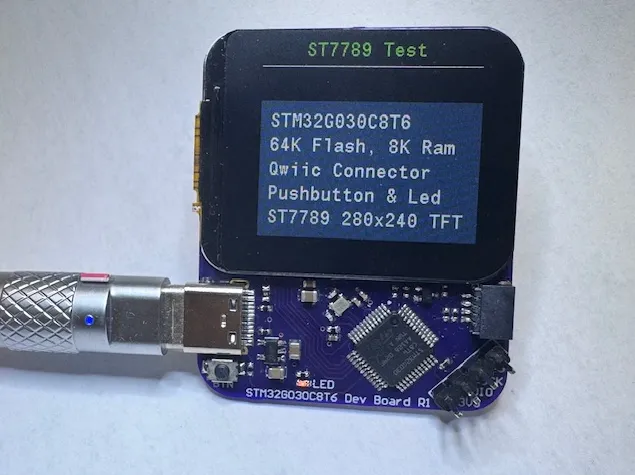
Memory Usage Note With HOR_LEN = 48, the buffer uses 26,880 bytes of RAM. Your STM32G030C8T6 has 8KB RAM total, so this uses about 3.3KB. If you need more RAM for other things, reduce HOR_LEN to 24 or 16.
Additional Optimization - Increase SPI Speed In your main.c, try changing the SPI prescaler from 4 to 2:
Reposted with the author's permission. More Code on GitHub: https://github.com/mike-rankin/STM32G030_ST7789_DMA_Dev_Board. This is GitHub account: https://github.com/mike-rankin where you will explore more excellent projects. He is a good DIY maker who designs custom ESP32 IoT projects using Altium Designer, Arduino IDE and Fusion360. Welcome everyone to follow.