Story
Hi,
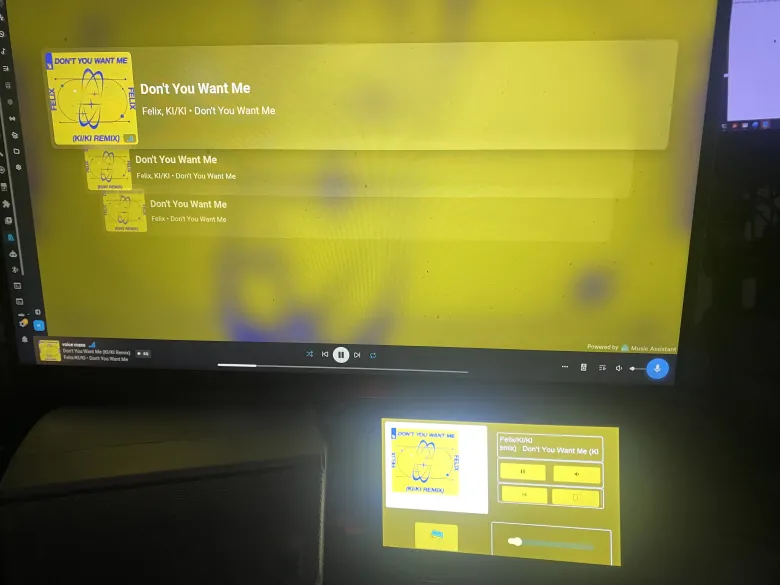
I wanted to share a tutorial on how to display currently playing music from Music Assistant on an ESP32 display with LVGL — including album art and dynamic recoloring of the entire UI based on the cover color.
What it does
Displays album art, song title, and artist
The colors of the entire UI (background, buttons, text) automatically change based on the cover of the currently playing song
Does Spotify work via Music Assistant
What you need
ESP32-S3 with display and LVGL in ESPHome
Home Assistant with Music Assistant
SSH access to HA
Python with Pillow library (pip3 install Pillow --break-system-packages)
How it works
Music Assistant creates its own media player entity (in my case media_player.voice_mass_3) that has an entity_picture attribute with the direct Spotify CDN image URL — it is publicly accessible without authentication.
Step 1 — Python script for color extraction
Save as /config/album_color.py:
"https://www.homeassistant-cz.cz/viewtopic.php?p=26059#p26059"
Step 2 — HA Configuration
Into configuration.yaml:
Automation that runs a script when a song changes:
Step 3 — ESPHome YAML
Album Cover:
Dynamic colors — sensors + lambda:
Result
The UI automatically changes color with each new song. The text brightness is adjusted to always be readable.
the last idle page, I have a file to test, so it's not much use
with the red button I turn off the amplifier that I connected to the vpe (sendspin), think about whether to leave it, it suits me, it's good to see if it's on.
then it still wants to fix the "next" icon button and then probably the background around the image
so I spent almost the whole night on it and the last few hours with a lot of help from AI, so Claude has the biggest part in making it work + he prepared a summary for me
And finally, thanks to Pete30, who will definitely know his job there and of course Claude