
Story
Introduction
Building advanced, multi-legged robots like hexapods or quadrupeds often leads to a nightmare of cable clutter and power instability. When 18 to 32 servos move simultaneously, standard Raspberry Pi HATs simply cannot handle the current spike, causing the Pi to brownout and reboot.
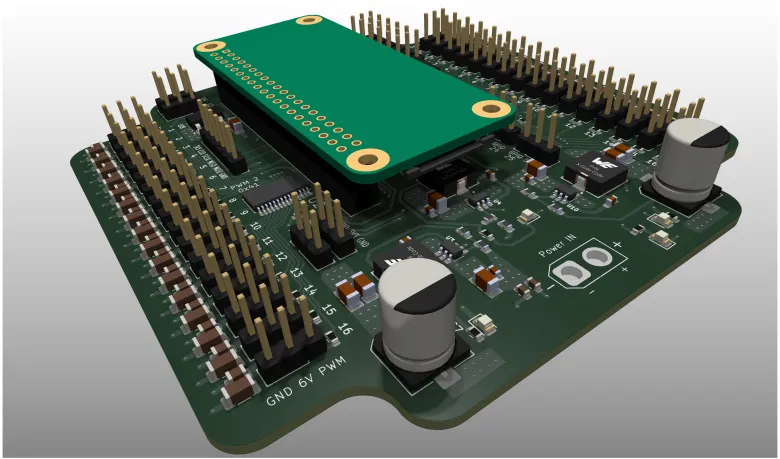
I designed the OmniBot Zero (Hexapod V2) to solve this exact problem. It is a heavy-duty, 4-layer "Swiss Army knife" control board built directly for the Raspberry Pi Zero 2 W. It combines massive power delivery, 32-channel servo control, and spatial awareness into one compact footprint.
Features & Design
This board was designed with high reliability and robotics in mind. Key hardware features include:
-
Massive Power Delivery: The board takes a 12V input and uses three separate TPS565201DDCR step-down converters. This provides up to 15A of combined current (3x 5A) to ensure the Pi and the servos have rock-solid, isolated power.
-
32 PWM Channels: Driven by dual I2C-controlled PCA9685 chips, allowing you to control up to 32 servos with precise hardware PWM.
-
Built-in Kinematics Sensor: Features an onboard MPU-6050 6-axis IMU (Gyroscope & Accelerometer) for active balancing and gait calculation.
-
Real-Time Clock: Includes a DS3231M RTC to keep accurate time even when disconnected from the network.
-
Safe Logic Level Shifting: Uses a TXB0108PWRG4 level shifter to safely bridge the 3.3V Pi logic with 5V external sensors.
-
Clean 4-Layer PCB: Engineered for optimal thermal dissipation and clean power routing under heavy loads.
Program & Code
The board communicates entirely over the I2C bus, making it incredibly easy to program using standard C# or Python libraries.You can easily control the board using the Adafruit PCA9685 library and standard IMU libraries for Python.
Tutorials & Getting Started
Step 1: Assembly and Mounting
-
Solder the standard 40-pin GPIO header to your Raspberry Pi Zero 2 W.
Mount the Pi Zero onto the control board. -
Plug in your servos into the designated 3-pin headers (channels 1-32).
Step 2: Powering Up safely Connect a high-discharge 12V battery (like a 3S LiPo) to the main power terminal. The onboard step-down converters will automatically generate the required voltages for the servos and the 5V logic for the Raspberry Pi. Never power the Pi via its micro-USB/USB-C port while the main battery is connected!
Step 3: Software Configuration
-
Flash a fresh Raspberry Pi OS image.
-
Open the terminal and run
sudo raspi-configto enable the I2C interface. -
Run
i2cdetect -y 1in the terminal. You should see the addresses for both PCA9685 chips, the MPU-6050, and the RTC. -
Install your preferred Python libraries (e.g.,
pip install adafruit-circuitpython-pca9685) and start writing your robot's walking algorithms!
Feel free to reach out in the comments if you have any questions about the schematic or the code!