








Story
Overview
A lightweight network-attached storage (NAS) file server for the Elecrow 2.8-inch ESP32 CrowPanel / ESP32 Solo Miner LCD display. The ESP32 serves files from the built-in microSD card over Wi-Fi and uses the TFT to show connection and storage status. Manage files from a web browser on the same local network.
Features
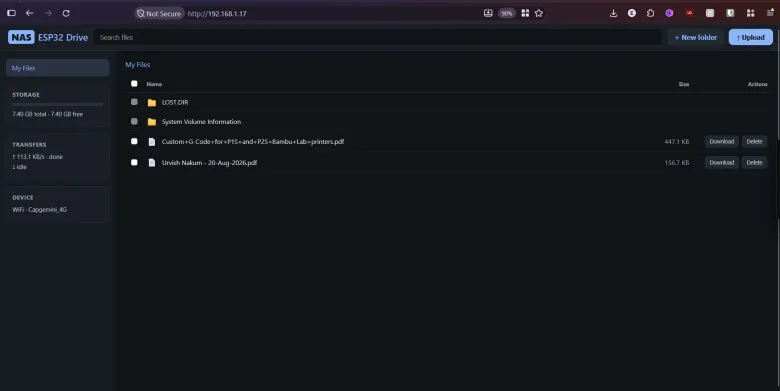
- Browser-based file manager for listing, uploading, downloading, and deleting files and creating folders.
- Drag-and-drop web UI with upload progress.
- Captive-portal Wi-Fi provisioning and automatic access-point fallback when home Wi-Fi is unavailable.
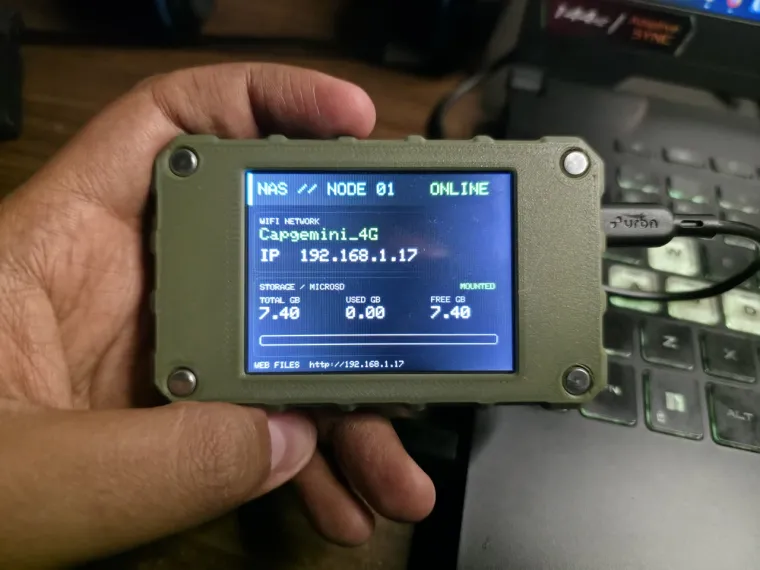
- TFT status screen showing Wi-Fi mode, IP address, SD total/free space, and web URL.
- SD mount retry and visual error handling; Wi-Fi reconnect with AP fallback.
- Optional default Wi-Fi credentials from a local, git-ignored
secrets.h. - OTA firmware updates via ArduinoOTA.
- Path validation to help prevent directory traversal.
Hardware
- Elecrow 2.8-inch ESP32 Solo Miner LCD Display / CrowPanel variant (ESP32-WROOM-32)
- 320 × 240 ILI9341V TFT and built-in microSD slot
- FAT32-formatted microSD card and USB data cable
- 2.4 GHz Wi-Fi network for normal operation
Build and flash with PlatformIO (recommended)
- Install Visual Studio Code and the PlatformIO IDE extension, or install PlatformIO Core.
- Open the
PlatformIOfolder containingplatformio.ini. - Optionally copy
include/secrets.h.exampletoinclude/secrets.h, then set your own default SSID/password. Keep this private file out of source control. - Build with
pio run, connect the board over USB, and upload withpio run -t upload. - Use
pio device monitorat 115200 baud to view startup and diagnostics.
First boot and access
- Insert a FAT32 microSD card and power the board.
- If no Wi-Fi credentials are saved, connect to the open
NAS-Setupaccess point and browse tohttp://192.168.4.1. - Enter your home Wi-Fi details in the setup portal. After the device connects, note the IP shown on the LCD.
- Open
http://<device-IP>/from a phone or computer on the same LAN. Copyindex.htmlto the SD card root if you want the richer drag-and-drop file manager.
Hardware pin and bus notes
The microSD card uses VSPI (MOSI 23, MISO 19, SCK 18, CS 5). The TFT uses a separate HSPI bus (MOSI 13, SCLK 14, CS 15, DC 2, backlight 27). PlatformIO configures TFT_eSPI through build flags, including USE_HSPI_PORT, so the display and SD card do not contend for the same SPI bus.
Security notes
The setup access point is open by default, and the file server provides upload/delete access without authentication. Use it only on a trusted local network, avoid exposing it to the internet, and never use sensitive Wi-Fi credentials as defaults. OTA updates are also enabled when connected to Wi-Fi.
Source and attribution
Project repository: https://github.com/papercodeIN/Elecrow. The project was ported from akashdip2001/NAS-with-ESP32. Shared under the MIT License.