






Story
Hi all — sharing a finished, working project for the **CrowPanel "Basic" HMI 7.0"**
(ESP32-S3-WROOM-1-N4R8, 800×480, GT911 touch) in case anyone wants something fun to
run on theirs.
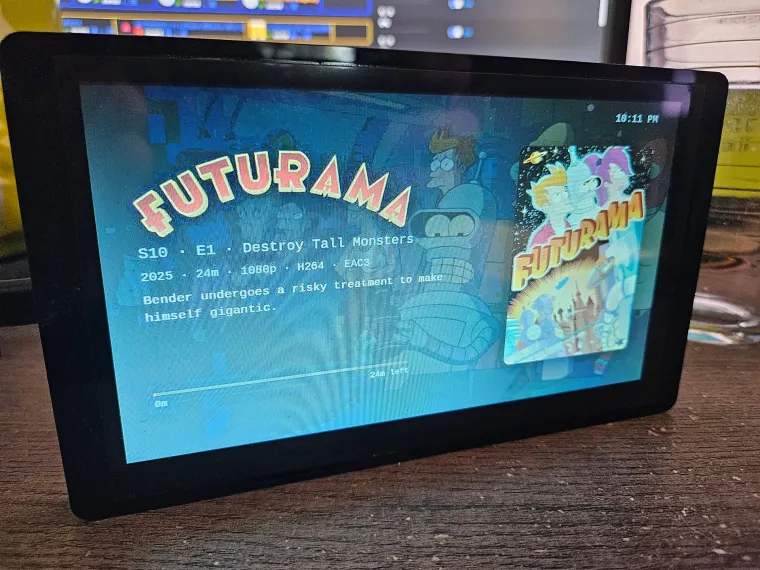
It shows a **media "now playing" card** — poster, title, plot, ratings, progress
bar, clock — for **Plex, Emby, or Jellyfin**, full-screen on the panel. It's built
on a project called [Marquee](https://github.com/Jamisonfitz/marquee) (which
normally casts to a Google Nest Hub); I added an **ESPHome** path so the CrowPanel
can show the identical card instead.
**Everything (ESPHome YAML for this exact board + setup):**
https://github.com/TRusselo/marquee-esp32
### How it works
A tiny helper on your server (Docker container `marquee-shot`) screenshots the real
card and serves it as a plain image. The CrowPanel just downloads that image and
displays it — so the ESPHome config stays simple and the result is pixel-perfect.
There's also a no-server "on-device" example config if you'd rather the ESP draw a
simpler card itself.
### Setup in short
1. Run Marquee + the `marquee-shot` helper on your LAN (Docker; Unraid has a
one-click template in the repo).
2. In ESPHome, flash `marquee-crowpanel-shot.yaml` from the repo — set your
server's IP at the top. First flash over USB-C, then OTA after that.
3. Play something — the card appears in a few seconds. Tap the screen to wake it;
it brightens on a new episode, goes full-bright when paused, dims during
playback, and turns the backlight off when nothing's playing.
---
## The idea in one picture
```
Plex / Emby / Jellyfin
│
▼
Marquee ───► renders a beautiful now-playing web card
│
▼
marquee-shot ───► screenshots that card to a plain image
(tiny sidecar)
│ http://your-server:8088/card.jpg
▼
ESP32 panel ───► downloads the image, shows it full-screen
(ESPHome)
```
The ESP32 is deliberately **dumb**: it just downloads a JPEG and paints it on the screen. All the pretty layout work happens on your server, where it's easy. That's the trick that keeps the ESP side simple and reliable.
---
## Two ways to do it (pick one)
### 1. Screenshot sidecar — recommended, pixel-perfect
A tiny extra container called **`marquee-shot`** opens Marquee's real card page in headless Chromium, screenshots it, and serves it as `/card.jpg`. The panel just shows that image. Because it's a photo of the *actual* card, it looks **identical** to what a Nest Hub would show — and you automatically get any future design changes for free.
The sidecar is a **decoupled add-on**: it only reads Marquee over HTTP and never changes it. That means it works against **any** Marquee — including the plain upstream image — so you don't have to run a forked app.
### 2. On-device render — no sidecar
The ESP32 rebuilds a simpler version of the card itself from Marquee's JSON + artwork. Lighter (no Chromium container), but it's a re-creation, not a pixel copy. There are two ready-made examples in the repo (`crowpanel-lambda.yaml` = simple poster+title; `crowpanel-lvgl.yaml` = cinematic dimmed backdrop).
Most people will want option 1.
---
## What you need
- An **Elecrow CrowPanel "Basic" HMI 7.0"** (ESP32-S3-WROOM-1-**N4R8**, 800×480 RGB IPS, GT911 touch). Other ESP panels work too — you just adjust the display pins/timings for your board.
- **Marquee** running somewhere on your LAN (Docker; also on Unraid Community Apps). Point it at your Plex/Emby/Jellyfin.
- The **`marquee-shot`** sidecar container (published image: `ghcr.io/trusselo/marquee-shot`).
- **ESPHome** (the dashboard/add-on you already use for your other sensors).
---
## Quick start
**1. Run the sidecar** (host networking, points at your Marquee):
```sh
docker run -d --name marquee-shot --network host --restart unless-stopped \
-e MARQUEE_URL=http://127.0.0.1:8084 \
-e PANEL_WIDTH=800 -e PANEL_HEIGHT=480 -e SERVE_PORT=8088 \
ghcr.io/trusselo/marquee-shot:latest
```
Open `http://your-server:8088/card.jpg` in a browser — you should see the current card. (On Unraid there's a one-click Community Applications template in the repo.)
**2. Flash the panel.** In ESPHome, create a device, paste `esphome/marquee-crowpanel-shot.yaml` from the repo, set the sidecar's IP at the top, and Install over USB the first time. After that, updates are OTA.
**3. Play something.** Within a few seconds the card appears and updates on play/pause/seek.
Full step-by-step: **[esphome/README.md](https://github.com/TRusselo/marquee-esp32/tree/main/esphome)** and **[sidecar/README.md](https://github.com/TRusselo/marquee-esp32/tree/main/sidecar)**.
---
## Nice touches it already does
- **Tap the screen to wake it** and brighten for 10s.
- **Brightens on a new title/episode** so you notice the change from across the room.
- **Full brightness when paused** (you're probably looking at it), **dimmed during playback** (cinema mode), **backlight fully off when nothing's playing** so it's dark at night.
- Only re-downloads the image when something actually changed (a tiny `/state.json` version counter), so it's easy on the network.
---
## The stuff I learned the hard way (so you don't have to)
This is the part I'd have loved to read before I started. These are all specific to getting an RGB ESP32-S3 panel stable in ESPHome:
- **Put the console on UART0** (`logger: hardware_uart: UART0`). ESPHome 2026.7 defaults the log console to USB-Serial-JTAG — but on this board those pins (GPIO19/20) *are the touch i2c bus*. Leaving the default makes touch init kill your logs and destabilize the app. This one cost me a whole evening of "why are there no logs?".
- **PSRAM is mandatory** (`psram: mode: octal`, N4R8 = 8 MB). The 800×480 framebuffer + JPEG decode buffers do not fit in internal RAM. Miss the `CONFIG_SPIRAM_*` flags and a fresh USB flash can hang at `entry`.
- **If you use LVGL, set `buffer_size: 5%`.** The 25% default eats the internal DMA RAM that Wi-Fi needs on an RGB panel, and then **Wi-Fi silently won't associate**. This looked like a Wi-Fi bug for ages; it was really an out-of-RAM problem. (The screenshot method sidesteps LVGL entirely — another reason I prefer it.)
- **Pin the ESP-IDF version** if Wi-Fi keeps dropping with "Association Expired" — a recent IDF had a Wi-Fi regression; pinning a known-good `version:` fixed it.
- **GT911 touch: run it polled, no interrupt pin.** On this board the touch reset sits behind a GPIO expander, and wiring the interrupt pin crashed boot for me. Polled at address `0x5D` just works.
- **Elecrow's own docs for this board are unreliable** (wrong/omitted pins, stale snippets). The reference that actually got me working was this **espboards.dev** write-up — much of it is literally correcting Elecrow's page: https://www.espboards.dev/blog/esphome-configuring-elecrow-7-inch-display/
All of these are already handled in the repo's YAML — I'm listing them because they're general lessons for *any* RGB ESP32-S3 panel, not just this one.
---
## Credit where it's due
The beautiful card and all the Plex magic is **[Marquee by Jamisonfitz](https://github.com/Jamisonfitz/marquee)** — please star that project. My repo just adds the ESP32/ESPHome path as an optional, decoupled add-on on top of it. I added Emby/Jellyfin support to the upstream project.