P4_Micropython_03_Play_Music: Playing "Twinkle, Twinkle, Little Star" Using I2S
1. Course Introduction
This lesson uses the I2S audio interface and external speakers of the CrowPanel Advanced 7-inch ESP32-P4 HMI to play "Twinkle, Twinkle, Little Star," which is generated in real time by the program. MicroPython generates 16 kHz, 16-bit, stereo sine wave data according to the note frequencies and continuously writes it to the I2S interface in 0.1-second data blocks; GPIO30 controls the amplifier enable. Upon completion, you will hear a continuous melody from the speakers and see initialization, playback, and completion logs in the Shell.
2. Learning Objectives
- Be able to correctly connect two speakers to the development board's audio interface while powered off.
- Be able to explain the relationship between the note table, beat duration, sample rate, I2S pins, and amplifier control.
- Be able to run
speaker.pyand determine whether the audio chain is functioning correctly based on the sound and logs. - Be able to safely modify
BEAT_DURATIONor the melody table, and restore the default values to complete a comparison experiment.
3. Preparations
- Hardware: One CrowPanel Advanced 7 / 9 / 10.1inch ESP32-P4 HMI AI Display development board, and one USB Type-C data cable that supports data transmission.
- Compatibility note: The hardware and software code for the 7 / 9 / 10.1-inch development boards are all interchangeable; only the board dimensions differ. Please select the appropriate model based on the display size and use case.
- One USB data cable that supports data transmission; do not use a cable that only supports charging.
- A Windows computer with Thonny IDE installed; if the latest version has flashing or runtime issues, use the validated Thonny 4.1.7 as documented.
- The Elecrow custom MicroPython firmware
lvgl_micropy_ESP32_GENERIC_P4-C6_WIFI-16_ELECROW_INCH7-9-10_1_V1_0.bin. - Before flashing, confirm that the serial port is not occupied by other software; power off the device before performing any wiring or plugging/unplugging expansion hardware.
- Two speakers and connecting cables that match the development board's interface.
- The
speaker.pyfile and the specified firmware from this lesson's directory.
4. Software Operation Steps
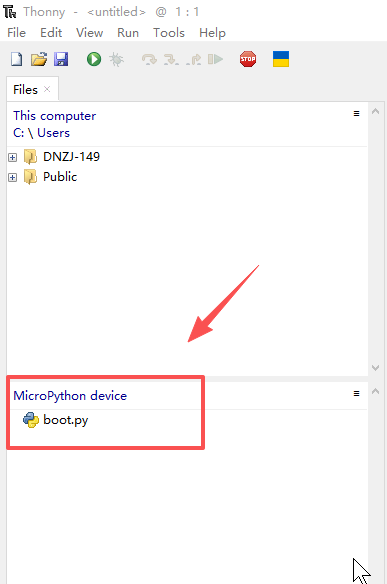
Flash the specified firmware using the method from Lesson 1. After completion, confirm that boot.py appears in the Thonny device area.
Flashing the firmware follows the same process as the first case.
You need to flash the "lvgl_micropy_ESP32_GENERIC_P4-C6_WIFI-16_ELECROW_INCH7-9-10_1_V1_0.bin" firmware onto the device.
Once the flashing is successful, a "boot.py" file will appear.
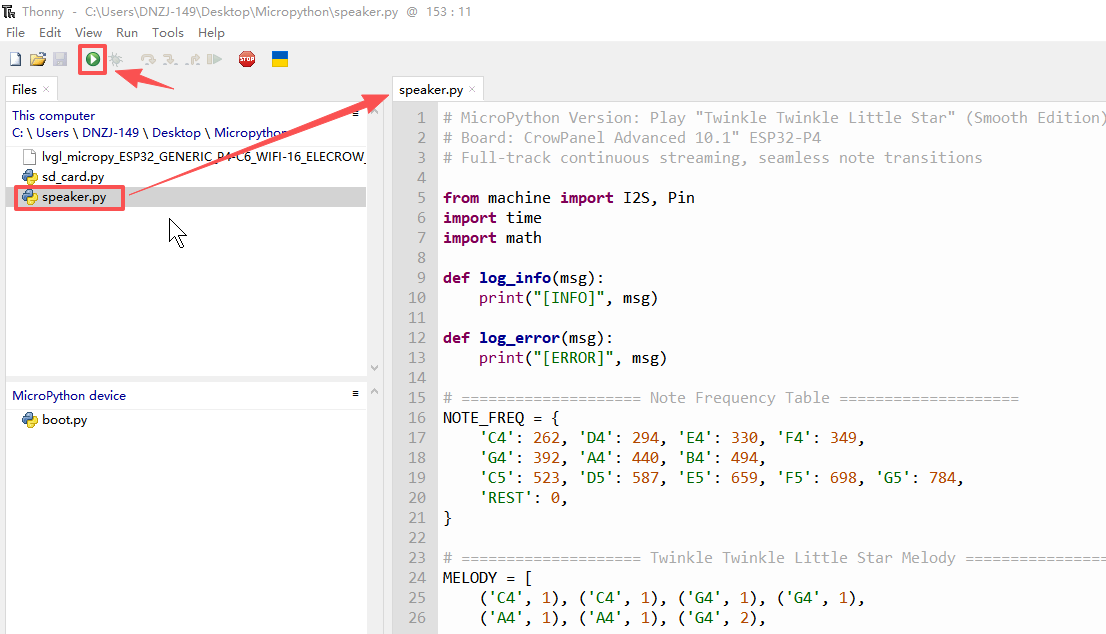
Upload and open speaker.py, then click Run. Once the Shell shows that I2S initialization is successful, the speakers should begin playing the melody.
5. Hardware Operation Steps
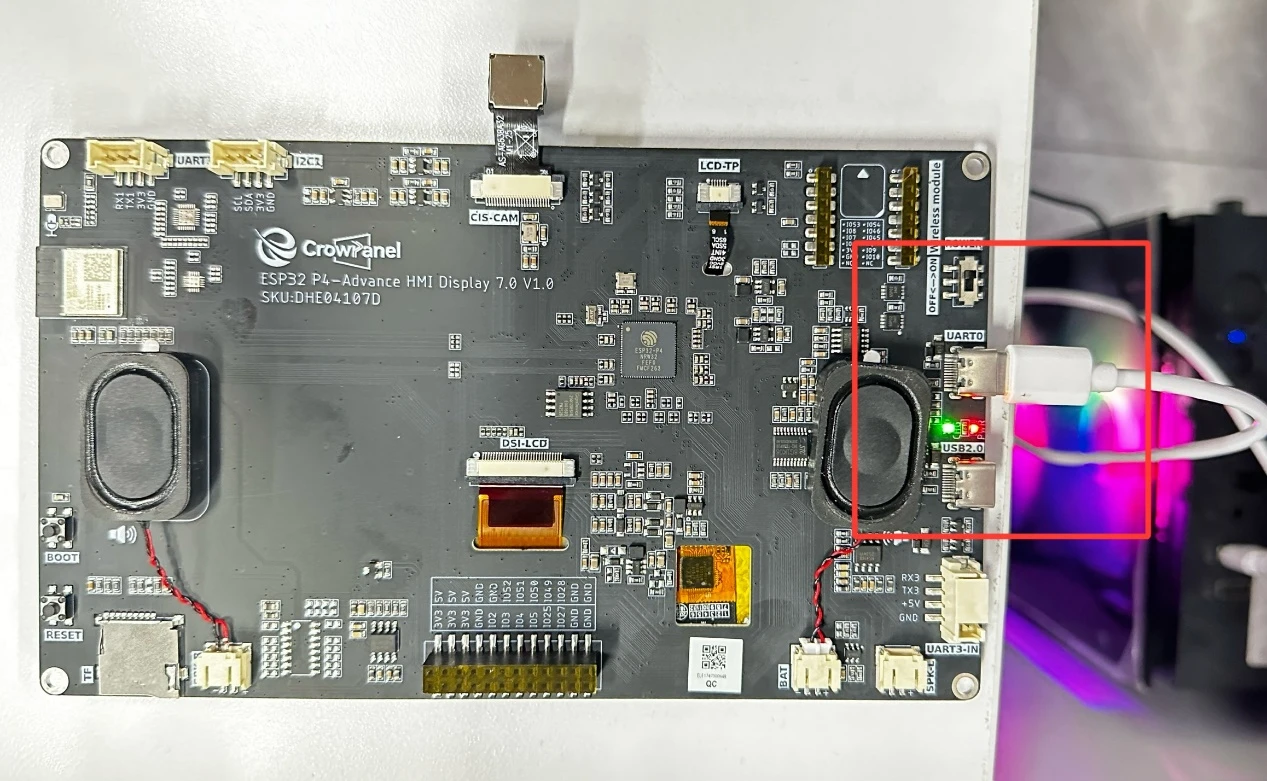
Connect the CrowPanel Advanced 7-inch ESP32-P4 HMI AI display to your computer using a USB cable.
Disconnect the development board's power, plug the left and right speaker connectors into their corresponding interfaces, confirm that the connectors are fully seated and the wires have no short circuits, then power the board back on.
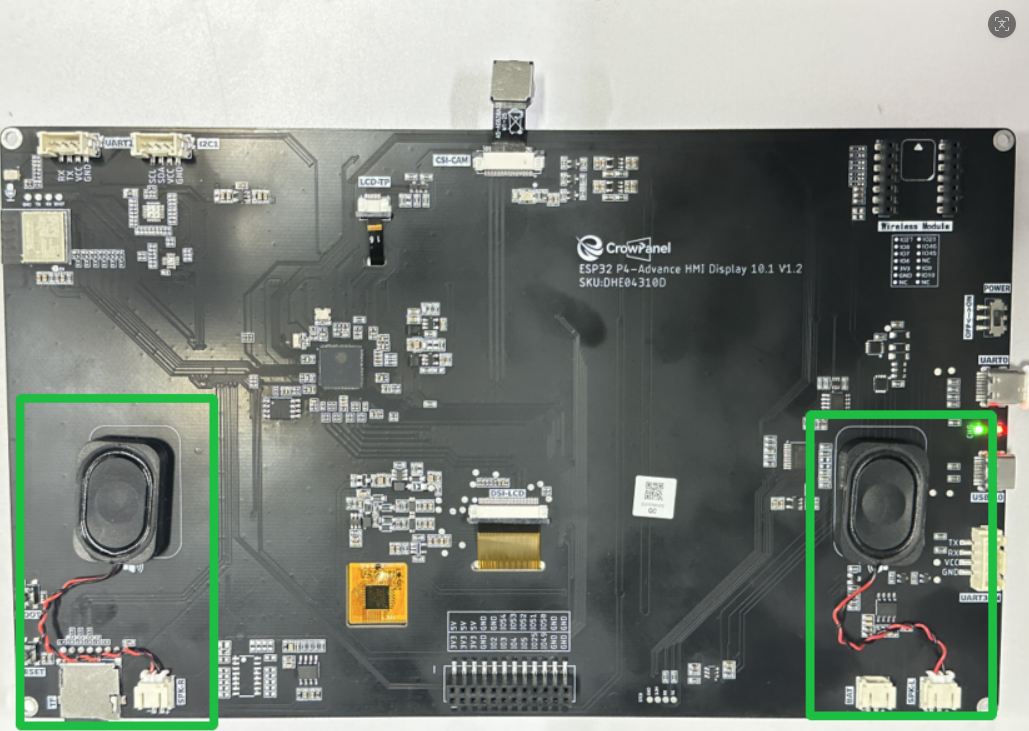
Keep a safe distance during the first run. If the sound is distorted or abnormally sharp, stop the program immediately and check the speaker specifications and connections.
6. Key Code Explanation
6.1 I2S and Amplifier Control
AUDIO_GPIO_LRCLK = 21
AUDIO_GPIO_BCLK = 22
AUDIO_GPIO_SDATA = 23
AUDIO_GPIO_CTRL = 30
SAMPLE_RATE = 16000
LRCLK determines the left/right channel frames, BCLK provides the bit clock, and SDATA transmits the sample data. The program creates an I2S1 TX, 16-bit, Stereo, 16 kHz output. set_audio_ctrl() uses inverted logic to control GPIO30; arbitrarily changing it to non-inverted logic may leave the amplifier permanently off.
6.2 Waveform Generation
generate_chunk() generates CHUNK_SEC × SAMPLE_RATE samples each time, copying each sample to both the left and right channels. When the note frequency is 0, it outputs silence; for other notes, it uses a sine wave with an amplitude of 22000. The phase offset accumulates continuously between data blocks to reduce abrupt changes and popping at block boundaries.
def generate_chunk(frequency, chunk_sec, sample_rate, phase_offset):
    """Generate a small chunk of sine wave"""
    samples = int(chunk_sec * sample_rate)
    buffer = bytearray(samples * 4)
    amplitude = 22000 if frequency > 0 else 0
    two_pi = 2 * math.pi

    for i in range(samples):
        if frequency > 0:
            sample = int(amplitude * math.sin(two_pi * frequency * (phase_offset + i) / sample_rate))
        else:
            sample = 0
        left_bytes = (sample & 0xffff).to_bytes(2, 'little')
        right_bytes = (sample & 0xffff).to_bytes(2, 'little')
        idx = i * 4
        buffer[idx:idx+2] = left_bytes
        buffer[idx+2:idx+4] = right_bytes

    return buffer, phase_offset + samples
6.3 Melody and Beat
Each tuple in MELODY consists of a note name and a number of beats, and its actual duration is beats × BEAT_DURATION. Changing BEAT_DURATION from the default 0.1 to 0.2 will make the melody roughly twice as slow; after the experiment, restore it to 0.1. A smaller CHUNK_SEC gives finer event switching, but increases the number of CPU calls.
    for note, beats in MELODY:
        freq = NOTE_FREQ.get(note, 0)
        duration = beats * BEAT_DURATION
        events.append((freq, duration))
7. Experimental Observations and Acceptance
After running, the Shell sequentially displays the program name, successful I2S initialization, amplifier enable, and continuous playback prompt; the two speakers should play the complete "Twinkle, Twinkle, Little Star."